Product catalog for billing: the guide to designing, managing and billing your offers
An offer that is not in the catalog does not exist for billing. Everything you sell, bill and measure starts there.
Launching a new offer should take days. In many companies it takes months: the product is created in the CRM, copied into the quoting tool, rebuilt in the billing system, sent to accounting and updated on the website. Every step means re-keying, a possible gap, and an invoice that does not quite match the signed contract.
The cause is almost always the same: there is no single, shared product catalog for billing. This guide explains what a product catalog is in a subscription business, how it differs from a classic item list, how to structure it, keep it current over time and connect it to quotes, subscriptions and invoices.
What is a product catalog for billing?
A product catalog for billing is the single reference for everything a company sells: its products and services, how they are packaged into offers, their prices, discounts, sales conditions and billing rules. It is the source of truth for sales, quotes, subscriptions and invoices.
It is also called an offer catalog or commercial catalog. In companies that sell subscriptions and usage, it goes far beyond a list of items with a price. It describes:
- what is sold (access, a service, an add-on, a device),
- how it is sold (alone, in a bundle, with a commitment, to which customers),
- how it is billed (flat fee, usage, tiers, overage, at what frequency),
- and within which limits (compatibility, prerequisites, regions, validity dates).
A good catalog lets a marketing team create a new offer by configuring it, not by asking for development work.
Product catalog, item catalog, PIM: what is the difference?
An item catalog describes articles, a PIM (product information management) tool manages their presentation content, while a billing product catalog describes what is sold, at what price and under which billing rules.
| Tool | What it describes | Main users | Question it answers |
|---|---|---|---|
| Item catalog (ERP, e-commerce) | Items, SKUs, list price | Logistics, e-commerce | "What does this item cost?" |
| PIM | Descriptions, images and display attributes | Marketing, e-commerce | "How do we present this product online?" |
| Billing product catalog | Offers, add-ons, bundles, prices, discounts, sales and billing rules | Product marketing, sales, order management, billing | "What can we sell this customer, at what price, and how do we bill it every month?" |
All three can coexist. But only the billing catalog carries what makes the invoice: the price rule, the frequency, the discounts, the usage counters. In a subscription business, it must be the reference.
The building blocks of a product catalog
A product catalog is built in layers: basic products and services, prices and calculation rules, offers that combine them, then bundles and rules that frame the sale.
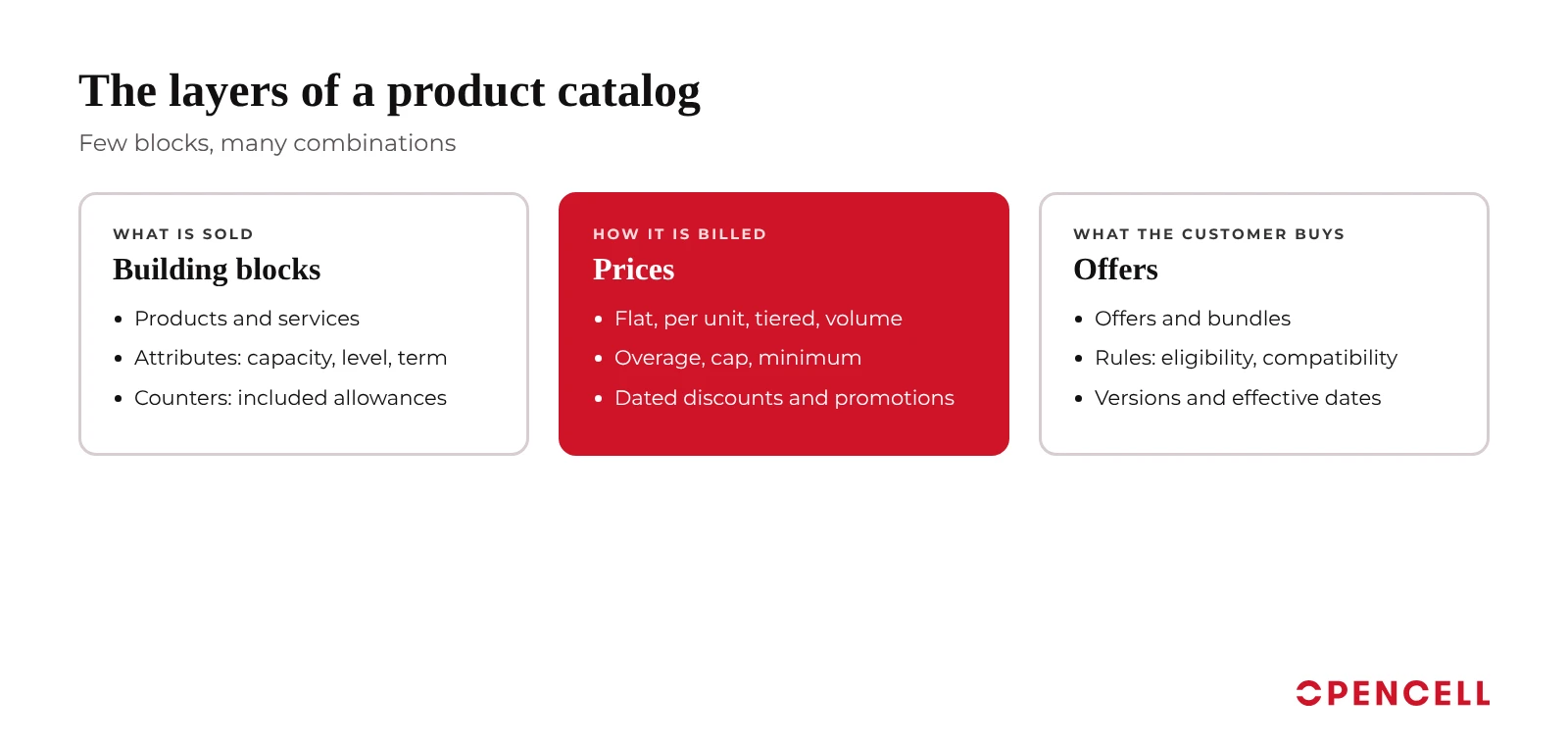
- Products and services. The basic blocks: access, a license, an add-on, a support service, a device. Each carries attributes such as speed, capacity, service level or duration.
- Prices and calculation rules. Each product has one or more prices: setup fee, recurring fee, usage, penalties. Each price follows a model: flat, per unit, tiered, volume, overage, capped.
- Counters. For offers with an included allowance (minutes, gigabytes, API calls, credits), the catalog defines what is counted, over which period, and what happens beyond it.
- Offers. An offer combines products and prices into a commercial proposal, such as "Pro plan, 50 users, standard support, 12 months". This is what the customer subscribes to.
- Bundles. Several offers combined with a benefit: a bundle discount, an included service, a single invoice.
- Sales rules. Eligibility, compatibility and exclusions, regions, sales channels, start and end dates of sale.
- Discounts. Permanent discounts, time-limited promotions, prices negotiated in a master agreement.
The telecom industry standard formalizes this separation: the TM Forum TMF620 Product Catalog Management API distinguishes the product specification (what it is), the product offering (what is sold) and the offering price. Outside telecom, the same separation is good practice: new offers reuse existing products and prices.
Why the catalog is the heart of quote-to-cash
The catalog feeds every step of quote-to-cash: quotes are built from it, orders create subscriptions that inherit its rules, billing applies its prices and accounting finds its codes. An inconsistent catalog produces inconsistent invoices.
- Quote. Sales reps pick offers, configure them and apply discounts within set limits. CPQ software is only as reliable as its catalog.
- Order and subscription. The signed order creates a subscription that inherits prices, commitments and counters. No re-keying, no gap.
- Usage. Consumption is rated with the catalog's rules: unit price, tiers, included volume.
- Invoice. Every invoice line traces back to a catalog price, which is what lets you explain an amount to a customer.
- Finance. Accounting codes, tax rules and revenue recognition rules are attached to catalog items.
When the catalog is split across tools, every copy drifts. The CRM price differs from the billing price, a discount accepted in a quote does not exist in billing, and the gap surfaces as a complaint. It is a classic cause of revenue leakage.
Modeling offers: good practices
A well-designed catalog reuses shared blocks, separates what is sold from how it is priced, and stays readable for sales. The golden rule: few products, many combinations.
- Start from what the customer buys, not from your org chart.
- Separate product, offer and price, so one product can sit in several offers at different prices without duplication.
- Use attributes instead of one variant per combination: one "License" product with a "number of users" attribute beats a hundred license SKUs.
- Standardize price models. A few models (flat, per unit, tiered, volume, overage) cover most needs. See our pricing models guide.
- Write compatibility rules into the catalog, not into sales reps' heads.
- Plan for usage from day one. Well-defined counters make it easy to add overage or usage add-ons later. See our usage-based billing guide.
Versions, effective dates and customer migration
A catalog evolves: prices change, offers are replaced, promotions end. It must manage dated versions and know which version applies to each customer.
- Price increase. Applies to new customers from a given date, and to existing ones at renewal or after notice.
- End of sale. The offer is no longer sold, but existing customers keep their terms.
- Migration. Customers on an old offer move to the new one, with proration and possibly an incentive.
- Time-limited promotion. The catalog knows when it ends and billing applies it automatically.
- Negotiated prices. A contract price overrides the list price for the term of the contract.
Without versioning, every price change becomes a project. With it, it is a dated setting. This is also a key point when migrating billing systems: active legacy offers must be carried over.
One catalog, many channels
The catalog must be published to every sales channel: CRM and quoting, e-commerce, customer portal, partners and resellers. It is defined once and shared through APIs.
- CRM and CPQ need offers, add-ons, compatibility rules and discount limits.
- Website and self-care show self-service offers with a simple sign-up path.
- Partners sell a subset of the catalog, sometimes at specific prices, with revenue sharing or commissions to calculate.
- Countries need local prices, currencies, taxes and translated labels.
The rule: one definition, many views. A catalog copied by hand into each tool always ends up diverging.
Common mistakes
Catalogs go wrong for five reasons: variant sprawl, hard-coded pricing logic, no owner, no versions and copies in several tools.
- Sprawl. Every negotiation creates a "special" offer, and the catalog ends up with hundreds nobody understands.
- Hard-coded pricing. If a rule is coded in billing instead of configured in the catalog, every change needs development.
- No owner. The catalog belongs to marketing, sales, order management and finance, so to nobody.
- No versions. Editing an offer in place silently changes existing customers' invoices.
- Several copies. CRM, quoting, billing, website: each with its own version, and gaps found too late.
Industry examples
The structure is the same everywhere, but each industry brings its own blocks.
- Telecom. Plans, add-ons, devices, convergent bundles, commitments and technical compatibility. See our convergent billing guide.
- Energy. Offers by site and meter type, fixed or indexed prices, green options, time-of-use prices.
- SaaS and cloud. Per-user plans, feature add-ons, included API calls or storage, usage overage. See our SaaS billing guide.
- Mobility. Passes, profile-based fares, included minutes, daily caps. See our mobility billing guide.
Building your catalog in 6 steps
A catalog project succeeds when it starts from offers actually sold, simplifies them before configuring, and tests every offer all the way to the invoice.
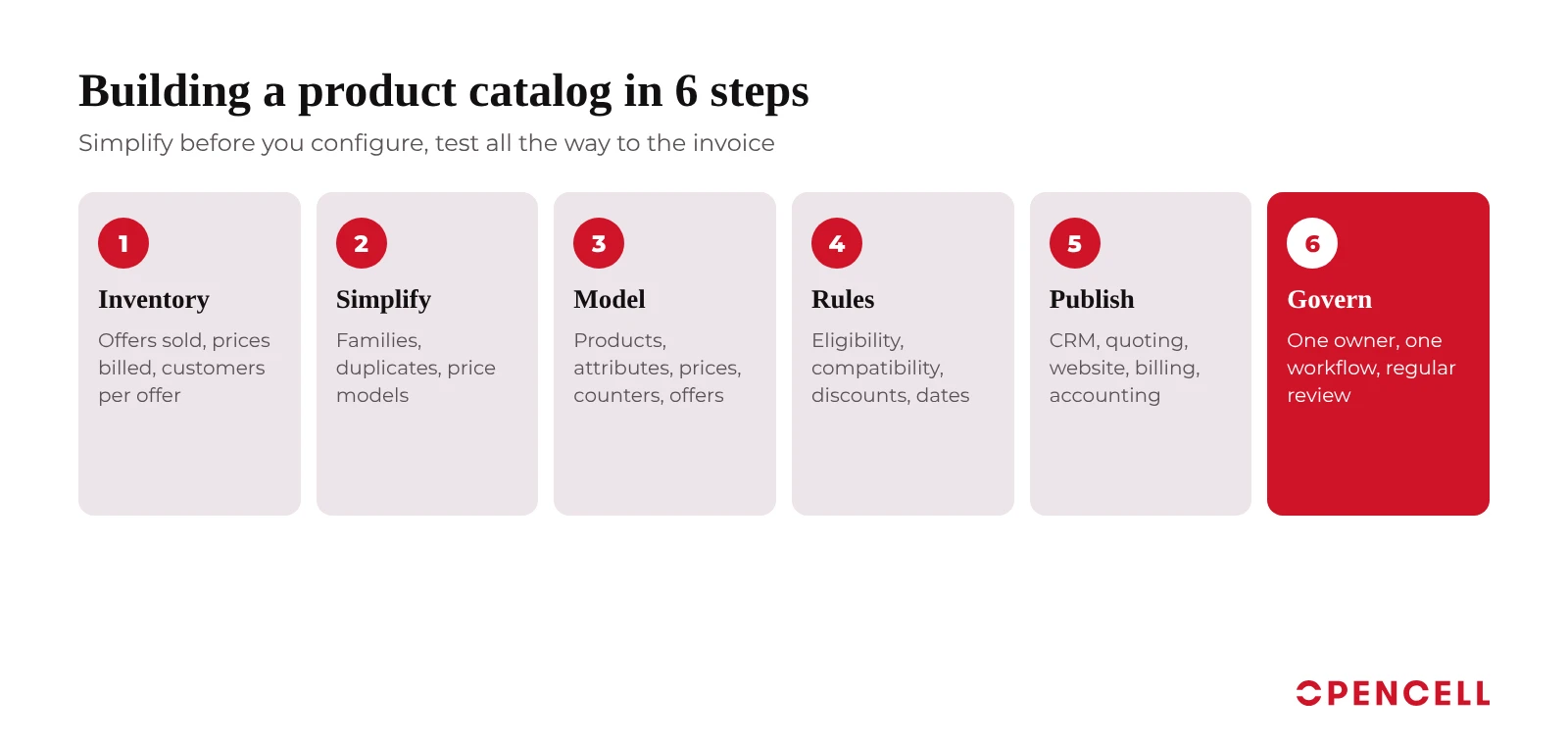
- Take inventory. Offers sold, prices actually billed, discounts granted, customers per offer.
- Simplify. Group into families, remove duplicates, choose reference price models.
- Model. Products, attributes, prices, counters, then offers and bundles.
- Write the rules. Eligibility, compatibility, discount limits, sale dates, migration rules.
- Publish and integrate. Connect the catalog to CRM, quoting, website, billing and accounting.
- Govern. Name an owner, define who creates, approves and publishes offers, review quarterly.
Before go-live, test each offer end to end: a quote, an order, a month of usage, an invoice, an accounting entry.
The 10 criteria to choose a solution
- No-code offer creation, in days.
- Product, offer and price separation, with reusable blocks.
- Every price model: flat, per unit, tiered, volume, overage, cap, minimum, combined.
- Counters and usage: allowances, rollover, overage.
- Bundles and discounts: bundle discounts, dated promotions, contract prices.
- Sales rules: eligibility, compatibility, regions, channels.
- Versions and effective dates, with customer migration.
- International: local prices, currencies, taxes, translated labels.
- A direct link to billing: subscriptions inherit catalog rules, with no re-keying.
- Openness: APIs to publish the catalog to CRM, website, partners and accounting.
How Opencell helps
In Opencell, the product catalog and billing are one system: the offer configured in the catalog is the one that is quoted, subscribed, rated and billed.
- Complex offers with no built-in limits: services, price plans, counters, custom fields and bundles combine in the Catalog Manager module.
- Every price model: flat, per unit, volume, tiered, overage, minimum, cap, conditional discounts, revenue sharing.
- Targeted offers by region or market segment, with local prices, multi-currency and multi-tax.
- Quotes from the catalog and attribute-based product configuration.
- A shared catalog with CRM and e-commerce through more than 200 APIs.
- Rich offers in production: at Irish operator Eir, bundles with up to 40 distinct parameters.
- L'Alchimiste, an AI agent that turns a contract into a configured, ready-to-bill offer.
Frequently asked questions
What is a product catalog for billing?
It is the single reference for everything a company sells: products and services, offers and bundles, prices, discounts, sales rules and billing rules. It is the source of truth for quotes, subscriptions and invoices.
What is the difference between an item catalog and a billing product catalog?
An item catalog lists articles and their price. A billing product catalog also describes how products are packaged, sold and billed: add-ons, bundles, price models, usage counters, discounts and conditions.
How do you handle a price increase in the catalog?
By creating a new price version with an effective date, applied to new customers from that date and to existing customers at renewal or after the contractual notice.
Who should own the product catalog?
Usually product marketing or the offer team, with an approval workflow involving sales, order management, finance and billing. One owner must have the final say.
How do you connect the product catalog to billing?
By using the same catalog for quoting and billing, or by publishing it through APIs to each tool. The subscription created at order time must inherit the offer's rules directly.
The catalog does not just describe what you sell. It decides what you can bill.
Key takeaways:
- the product catalog is the source of truth for quotes, subscriptions and invoices,
- separate product, offer and price to reuse blocks and launch offers without development,
- manage dated versions so price changes never hit existing customers by mistake,
- publish one definition to every channel instead of copying the catalog,
- give it an owner and test every offer all the way to the invoice.
Go further with Opencell
Opencell is an agile monetization platform that automates quote-to-cash, from quote to cash collection, for subscription and usage-based services. Its product catalog combines products, services, price plans, counters and bundles, and feeds quotes, subscriptions and billing. Its core is open source, it offers more than 200 APIs, deploys as sovereign SaaS, in the cloud or on your own servers, and goes live in 3 months on average. It manages €14 billion in customer revenue for around fifty customers.
Want to launch offers faster, without coding them?