Billing system migration: the enterprise guide
A billing migration is not a software swap. It is moving your revenue engine while it keeps running.
A billing system migration is one of the riskiest projects a company can run. Billing calculates what every customer owes, produces the invoices and feeds accounting and collections. Get the migration wrong and you get wrong invoices, angry customers and lost revenue. So many companies put it off for years, stacking spreadsheets and custom code around a system that no longer keeps up.
Most migration guides are written for small businesses: export your customers, import your invoices, pick a date. This one is for companies that bill subscriptions, usage and high volumes. It covers when to migrate, what data really has to move, how to cut over without interrupting billing, and how to choose the new platform.
When should you replace your billing system?
Replace your billing system when it starts holding the business back: new offers take months to launch, manual workarounds multiply, billing errors keep coming back, maintenance costs climb, or a new regulation cannot be met.
Eight signals show up in almost every project:
- Launching an offer takes months. A new plan, a usage-based option or a volume discount needs development instead of configuration.
- Spreadsheets have become the real system. Part of the calculation (usage, discounts, proration) happens outside the tool, with no control and no audit trail.
- Billing errors keep coming back. Credit notes in batches, customer disputes, invoices held before sending.
- The billing close keeps getting longer. Each monthly run needs days of manual checks and fixes.
- The system cannot handle the volume. Batch jobs run past the night, usage data arrives faster than it can be rated.
- Maintenance gets more expensive every year. Unsupported version, scarce skills, every change touches code nobody fully understands.
- The business model is changing. Subscriptions, usage-based pricing, new countries or new legal entities that the tool was never built for.
- A new obligation is coming. E-invoicing, tax reporting or new tax rules that the vendor supports late, or not at all.
One signal does not always justify a migration. Three or four almost always do. The cost of doing nothing is real even if it sits in no budget: unbilled revenue, hours spent on checks, offers never launched. Our guide on revenue leakage shows how to measure it.
Replace, extend or phase out: three options
Changing your billing system does not have to mean replacing everything at once. You can replace the whole system, run a new platform alongside the old one for new offers, or move offers, markets or entities across one at a time.
| Option | How it works | When it fits | Watch out for |
|---|---|---|---|
| Full replacement | The new system takes over every customer and every offer | Legacy at end of life, well-understood scope | Data migration and the cutover date |
| Extend | The new platform runs new offers, the legacy keeps the existing base | Urgent need to launch offers, stable legacy | Two systems to run and reconcile |
| Phased replacement | Offers, markets or entities move over one by one | Large scope, high risk, several countries or entities | Total duration and running two systems |
The "extend" option is often underrated. It lets you launch the offers that matter (subscriptions, usage, bundles) on a modern platform, prove the value, then move the legacy base at your own pace. It also lowers risk: the new platform proves itself on a limited scope before taking on the rest.
Phased replacement has a hidden cost: for the whole transition you run two systems, with two teams, two contracts and reconciliations in between. Set a decommissioning date for the legacy system on day one.
What data to migrate (and what gets forgotten)
A billing data migration is not just customer records and invoices. You also need active contracts and subscriptions, the product catalog and prices, balances and schedules, usage counters, payment methods and the history you actually use.
Billing data falls into three groups:
- Reference data: customers and account hierarchies (group, subsidiaries, sites), billing addresses, payment terms, product catalog and price plans.
- Live data: active subscriptions and their dates (start, renewal, end of commitment), running discounts, usage counters and tiers, direct debit mandates, customer balances, installment plans, unused credits and credit notes.
- History: past invoices, payments and disputes. Most companies migrate the history that customer service, collections and auditors need, and archive the rest in a searchable format.
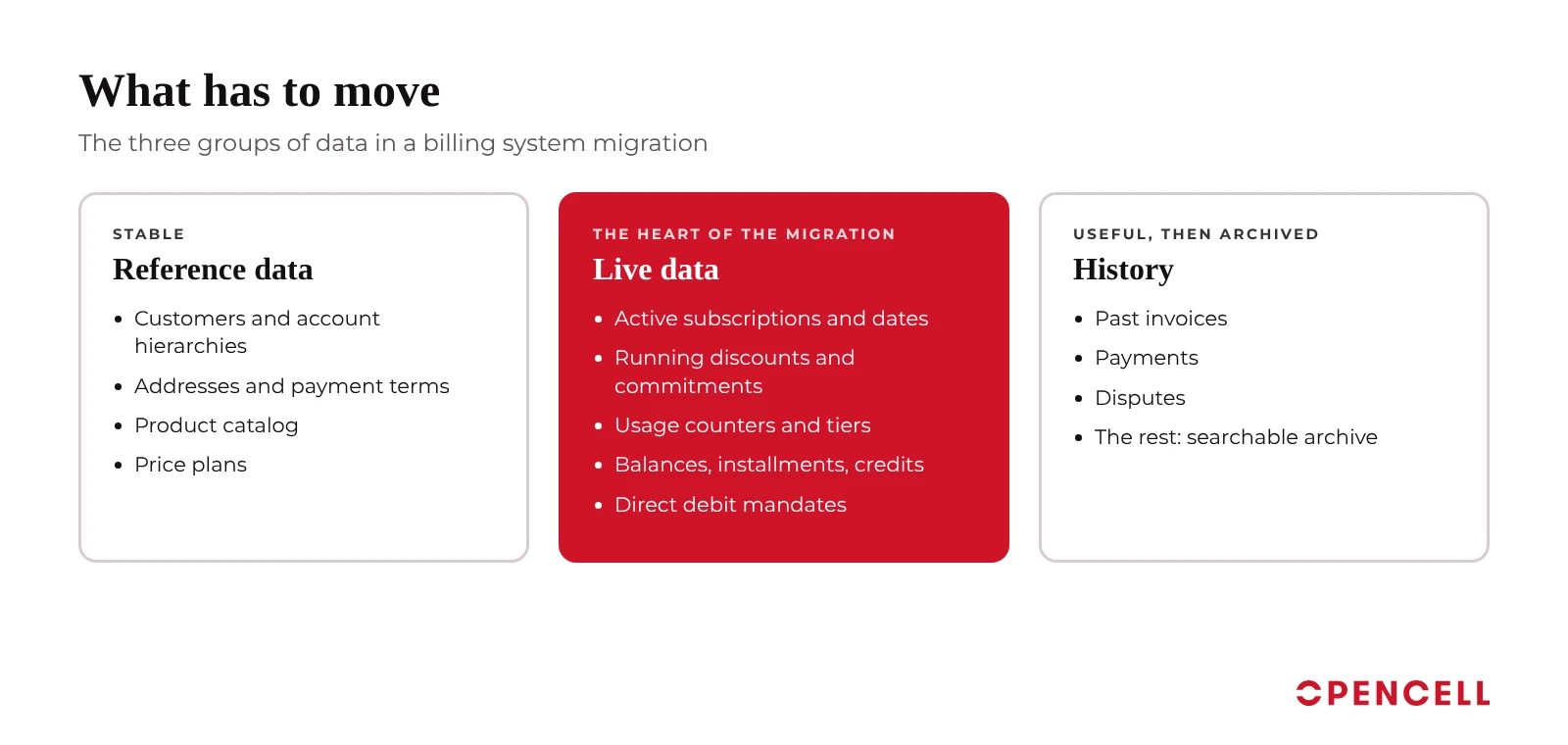
The costliest gaps are almost always in live data: a usage counter reset to zero that skips a tier, a commitment discount that disappears, a renewal date shifted by one day that bills a customer twice. Treat data migration as a project of its own, with written mapping rules between the old and new data models.
Migration is also the right time to clean up: duplicate customers, offers with no subscribers left, legacy price plans nobody sells any more. Move messy data and you get a messy new system.
Six migration risks and how to avoid them
The main risks of a billing system migration are lost or corrupted data, amount differences between old and new calculations, broken integrations, interrupted billing at cutover, confused customers and a slipping timeline.
| Risk | What happens | How to avoid it |
|---|---|---|
| Incomplete or wrong data | Customers without subscriptions, wrong balances | Written mapping rules, volume and total checks on every trial run |
| Amount differences | The new invoice does not match the old one | Parallel billing over one or more cycles, every gap explained |
| Broken integrations | CRM orders lost, missing journal entries | Full inventory of inbound and outbound flows, end-to-end tests |
| Interrupted billing | A cycle billed late or not at all | Cut over between two cycles, rollback plan ready |
| Confused customers | New invoice layout, new account number | Early communication, approved invoice templates, trained support team |
| Slipping timeline | The project drags on, the legacy stays on | Frozen scope, adapt processes to the platform rather than the reverse |
The most underestimated risk is the last one. Billing projects rarely slip because of technology. They slip because every quirk of the old system gets rebuilt as is, instead of asking whether it still serves a purpose.
The 6-step migration plan
A successful billing migration follows six steps: scope, select, configure, migrate data, run in parallel, then cut over and stabilize. Each step has its own deliverable and sign-off, and none can be skipped.
- Scope. List what you bill (offers, pricing models, volumes, entities, countries), the connected systems (CRM, ERP, payments, e-invoicing) and the pain points. Set measurable goals: time to launch an offer, length of the billing close, credit note rate.
- Select. Test the candidates on your own cases: have each one calculate a handful of your most complex real invoices. The 10 criteria below make a good scorecard.
- Configure. Build the catalog, pricing rules, billing cycles and invoice templates in the new platform. Golden rule: configure, don't customize.
- Migrate data. Write the mapping rules, run several full trial migrations, check volumes and totals on each run.
- Run in parallel. Run old and new systems on the same data for one or more cycles, compare invoice by invoice, explain every difference.
- Cut over and stabilize. Switch between two cycles, monitor the first runs closely, keep the legacy system read-only, then shut it down on the planned date.
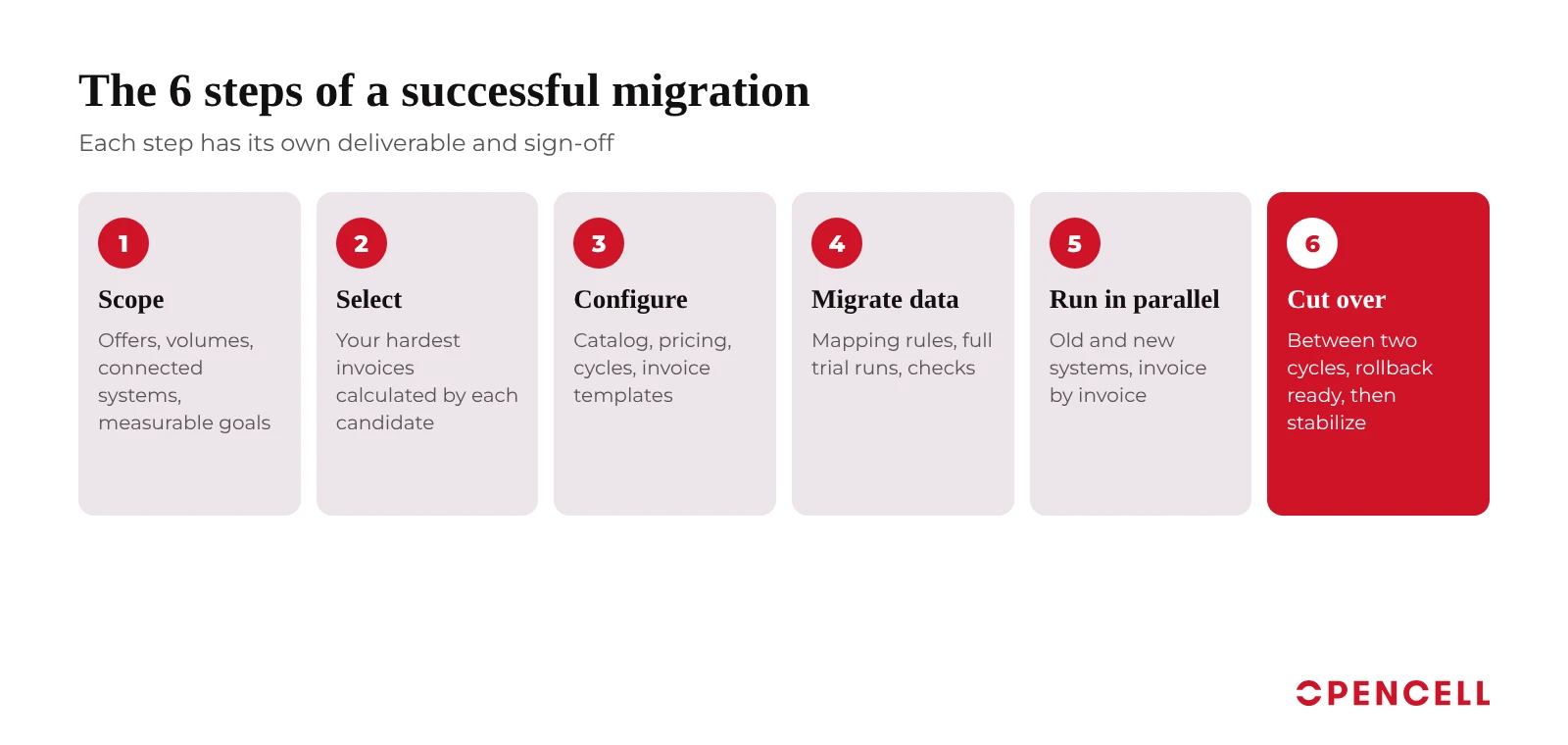
Parallel billing is the step that makes the difference. It takes time, but it is the only way to prove before cutover that the new system calculates correctly. Differences come from three places: a configuration error, a data mapping error, or an error in the legacy system that nobody had noticed. The third is more common than people think.
Big bang, phased or parallel: choosing your cutover
There are three cutover strategies: switch everything at once (big bang), move customers or offers in batches, or run both systems in parallel before switching off the old one. The right choice depends on volume, risk appetite and offer complexity.
| Strategy | Pros | Cons | Best for |
|---|---|---|---|
| Big bang | One date, one system to run afterwards | Risk concentrated on one day, hard to roll back | Simple scope, moderate volumes |
| Phased (batches) | Risk spread out, lessons learned batch after batch | Two systems at once, reconciliation rules | High volumes, many offers or countries |
| Parallel run, then switch | Differences caught before cutover, high confidence | Double feeds during the trial | Complex offers, business-critical billing |
Large companies often combine the last two: a first batch of customers runs in parallel for one or two cycles, then switches; later batches follow with lighter checks once the method is proven. Choose the first batch carefully: representative enough to test the hard cases, small enough to limit the impact of an incident.
Whatever the strategy, the cutover happens between two billing cycles, never in the middle, and the rollback plan is written and tested before go-live day.
E-invoicing mandates: a good time to migrate?
E-invoicing mandates are pushing many companies to rethink their billing systems. In France, every company must be able to receive electronic invoices since September 1, 2026, and large and mid-sized companies must also issue them since that date.
According to the official French timeline, the obligation to issue e-invoices extends to small and medium-sized businesses on September 1, 2027. Invoices go through certified platforms, and some transactions (sales to consumers, international sales, payments) are reported separately.
Two mistakes to avoid:
- Confusing the billing system with the e-invoicing platform. The certified platform transmits invoices and their statuses. The billing system calculates the amounts. Switching e-invoicing platforms does not fix calculation problems.
- Migrating in a rush. A regulatory deadline is a good reason to start the project, not to compress it. It is safer to connect the current system to a certified platform while running a proper migration.
For more, see our guide on e-invoicing in France for large companies.
10 criteria to choose your new billing platform
Choose the new billing platform on its ability to calculate your most complex invoices, handle your volumes, connect to your systems and make data migration easier, not on a feature checklist.
- Your pricing models: flat fees, usage, tiers, commitments, overages, bundles, with no custom code.
- Proven volumes: lines per cycle and processing time, on data close to yours.
- Scope of the cycle: quote to cash, or just the invoice?
- Account hierarchies: groups, subsidiaries, sites, payers different from users.
- Multi-entity, currencies and tax: several legal entities, countries and VAT rules on one platform.
- E-invoicing and tax reporting: formats and connections to certified platforms.
- Migration tooling: bulk import, APIs, migration checks and reports.
- Openness: documented APIs to CRM, ERP and payment providers.
- Deployment and exit: SaaS, cloud or on premises; access to your data and a realistic way out.
- Vendor and references: comparable customers, migration method, actual time to go live.
Criterion 9 deserves special attention: how you will leave a platform matters as much as how you get in. Our guide to open source billing software covers this point.
How long does it take and what does it cost?
The duration of a billing system migration depends on the number of offers, volumes, integrations and data quality. For a large company, plan for several months. The budget is driven mainly by integration and data migration, rarely by the license alone.
Budget lines to plan for:
- License or subscription for the new platform.
- Integration: CRM, ERP, payment providers, e-invoicing platform.
- Configuration: catalog, pricing, cycles, invoice templates.
- Data migration: mapping rules, trial runs, checks.
- Parallel billing and testing.
- Running two systems during the transition, then archiving the legacy.
- Change management: team training, customer communication.
Three levers shorten the project significantly: a platform you configure rather than customize, industry templates ready to use (telecom, energy, services, SaaS) and a scope frozen early. Getting a first batch live, even a small one, matters more than a perfect master plan.
How Opencell can help
Opencell is a billing platform built for companies that bill subscriptions, usage and high volumes. Many of its customers come to replace or extend an existing billing system.
- Replace or extend. Opencell can take over your full scope, or run alongside the legacy to launch new subscription and usage-based offers, then take over the rest step by step.
- Configure, don't customize. Catalog, pricing rules, cycles and invoice templates are configured, with industry templates that speed up deployment.
- More than 200 APIs for data migration and for connecting CRM, ERP, payment providers and e-invoicing platforms.
- An open source core and the deployment you choose: sovereign SaaS, cloud or on premises. Your data and your exit options stay under your control.
- Enterprise scale: €14 billion in revenue managed, around fifty customers including Orange, Engie, Eir and Fnac Darty, and go-live in 3 months on average.
Frequently asked questions about billing system migration
When should you replace a billing system?
When it holds the business back: offers that take months to launch, calculations done in spreadsheets, recurring billing errors, a longer billing close, rising maintenance costs or a regulation it cannot meet. Three or four of these signals at once almost always justify a migration.
How long does a billing system migration take?
It depends on the number of offers, volumes, integrations and data quality. For a large company, plan for several months, parallel billing included. A first scope can go live sooner and then be extended batch by batch.
What data should you migrate to a new billing system?
Customers and account hierarchies, the catalog and prices, active subscriptions with their dates, usage counters, balances, installment plans, payment methods, and the history that customer service, collections and auditors need.
Should you run the old and new billing systems in parallel?
For complex or business-critical billing, yes. Running both systems in parallel for one or more cycles is the only way to check, before cutover, that the new system produces the same amounts, and to explain every difference.
Can you migrate billing systems in the middle of the year?
Yes, as long as you cut over between two billing cycles and migrate live data correctly: balances, counters, discounts and commitment dates. Many companies avoid the fiscal year-end, which already loads finance teams.
How do you avoid billing errors after go-live?
Prepare: written mapping rules, full trial runs, parallel billing, a cutover between two cycles and a rollback plan. Then monitor the first cycles closely: total checks, invoice samples and customer dispute tracking.
Is it better to extend a legacy billing system or replace it?
Extending works well when the legacy is stable and you mainly need to launch new offers fast. Replacing is better when the legacy is at end of life or blocks the business. Many companies extend first, then phase out the legacy.
A billing migration takes preparation. Done well, it accelerates growth.
Key takeaways:
- migrate when the system blocks new offers, multiplies workarounds or can no longer handle volume,
- full replacement is not the only option: extending or phasing out lowers the risk,
- live data (subscriptions, counters, balances) is the heart of the data migration,
- parallel billing is the best insurance against amount differences,
- choose the new platform on your hardest invoices, not on a scripted demo.
Go further with Opencell
Opencell is an agile monetization platform that automates quote-to-cash, from quote to cash collection, for subscription and usage-based services. Many of its customers come to replace or extend an existing billing system. Its core is open source, it connects to your ecosystem through more than 200 APIs, deploys as sovereign SaaS, in the cloud or on premises, and goes live in 3 months on average. It manages €14 billion in revenue for around fifty customers, including Orange, Engie, Eir and Fnac Darty.
Planning to replace your billing system?